---
title: "Teclast F5: Automatischer Tablet Modus nach Neuinstallation"
description: "Das Teclast F5 kann beim Umklappen automatisch in den Tablet Modus wechseln. Wir zeigen euch, wie ihr die Funktion nach einer frischen Installation von Windows wiederherstellen könnt."
url: "https://www.chinamobilemag.de/tutorials/teclast-f5-tablet-modus-neuinstallation.html?layout=listings"
date: "2026-08-28T18:25:59+00:00"
language: "de-DE"
---
# Teclast F5: Automatischer Tablet Modus nach Neuinstallation
[Tutorials](https://www.chinamobilemag.de/tutorials.html)
Montag, 01. Oktober 2018
[ 0 Kommentare ](https://www.chinamobilemag.de/tutorials/teclast-f5-tablet-modus-neuinstallation.html?layout=listings#comments)
☕️ [Spende für die Kaffeekasse](https://www.paypal.com/donate/?cmd=_s-xclick&hosted_button_id=F7TNFGGE8Z5XW&source=url&ssrt=1741333708435) | ❤️ [Bevorzugte Quelle bei Google](https://www.google.com/preferences/source?q=chinamobilemag.de)
[](//www.chinamobilemag.de/images/easyblog_articles/6075/teclast-f5-8.jpg "teclast-f5-8") 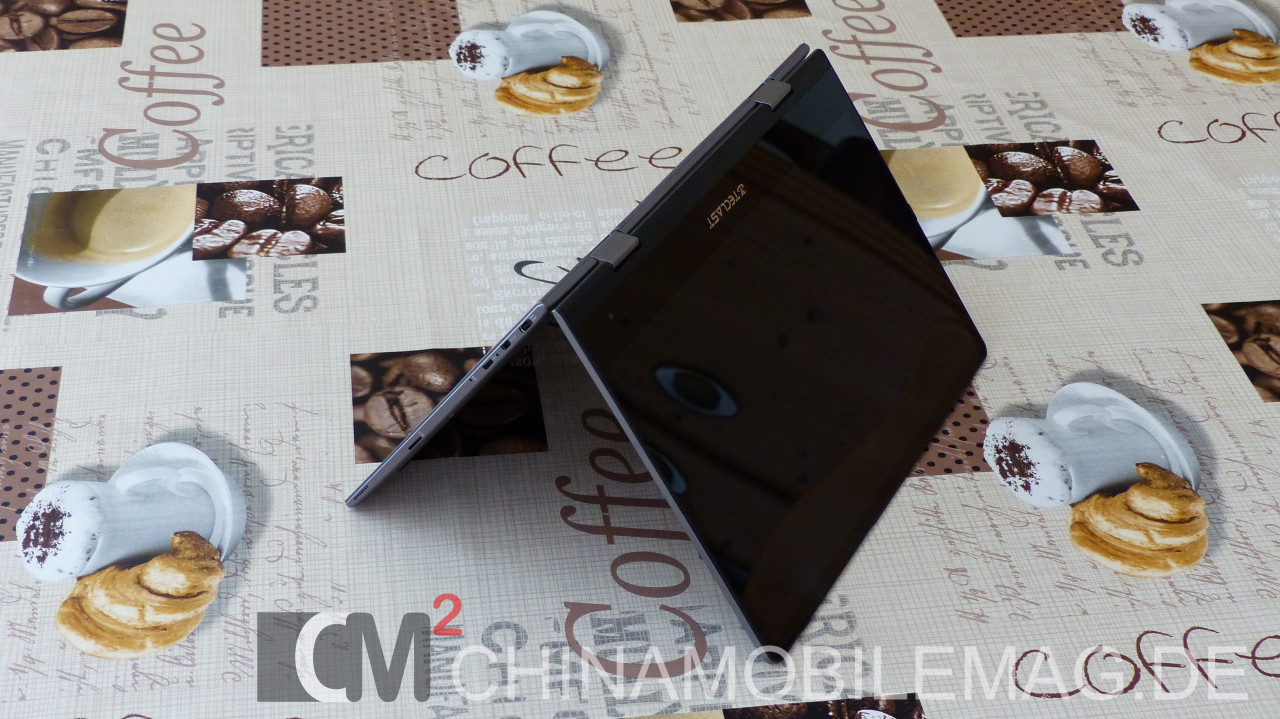
Das [Teclast F5](https://www.chinamobilemag.de/test/teclast-f5.html "Teclast F5 Test") kann als 360° Convertible sowohl als Tablet PC als auch als normales Laptop genutzt werden. Das Praktische daran ist, dass Windows beim Umklappen des Displays automatisch in den Tablet Modus wechselt und das Touchpad sowie die Tastatur deaktiviert. Installiert man Windows auf dem Teclast F5 neu, funktioniert das allerdings laut diversen Rückmeldungen nicht mehr. Wir haben uns die Geschichte deshalb mal genauer angesehen und herausgefunden, wie man die Funktion wiederherstellen kann.
[ Teclast F5 Treiber Download ](https://www.chinamobilemag.de/tutorials/downloads/download/25-teclast/46-teclast-f5-treiber.html)
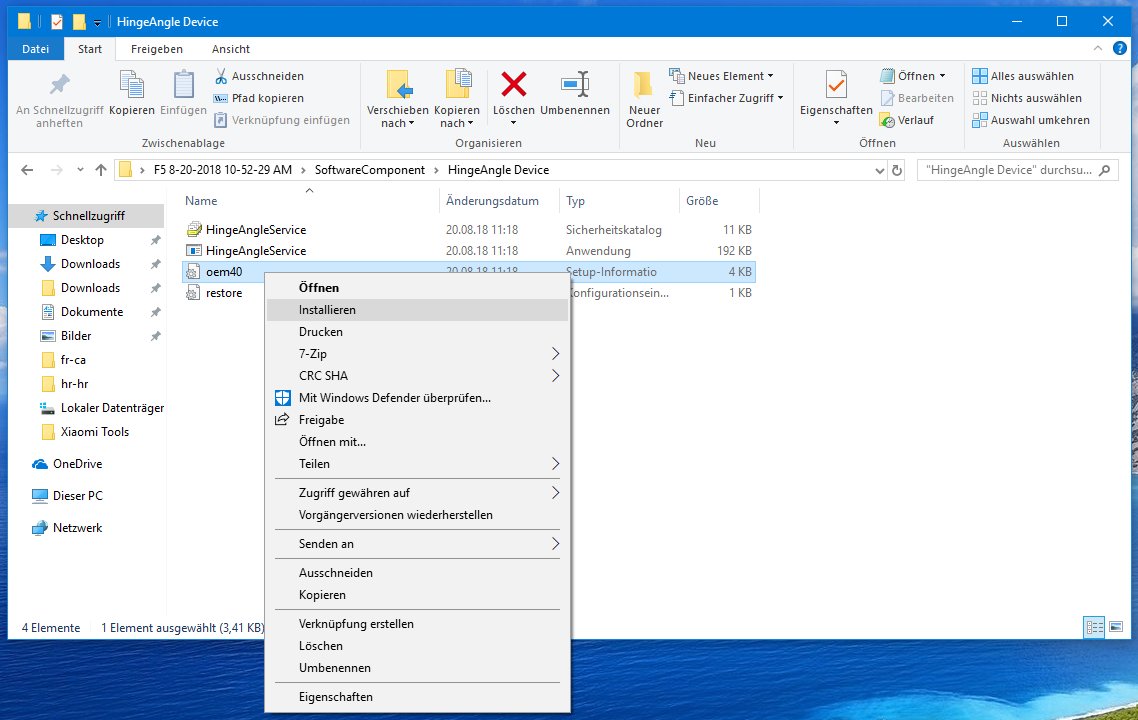
Ladet euch dazu einfach das oben verlinkte Treiber Paket herunter und entpackt die ZIP Datei. Öffnet nun den Ordner und navigiert nach "SoftwareComponent/HingeAngle Device/". Hier findet ihr die Datei "oem40". Führt darauf einen Rechtsklick aus und klickt dann auf "Installieren".
[  ](https://www.chinamobilemag.de/images/easyblog_articles/6075/Bildschirmfoto-2018-10-01-um-14.57.47.png)
Jetzt müsst ihr nur noch einen Neustart durchführen und das Teclast F5 wechselt wieder automatisch in den Tablet Modus.
Wie denkst du darüber?
[ **Glücklich** (4)
](https://www.chinamobilemag.de/javascript:void(0);) [ **Verliebt** (0)
](https://www.chinamobilemag.de/javascript:void(0);) [ **Überrascht** (0)
](https://www.chinamobilemag.de/javascript:void(0);) [ **Traurig** (1)
](https://www.chinamobilemag.de/javascript:void(0);) [ **Verärgert** (7)
](https://www.chinamobilemag.de/javascript:void(0);)
Markiert in:
[teclast](https://www.chinamobilemag.de/news/tags/teclast.html) [teclast f5](https://www.chinamobilemag.de/news/tags/teclast-f5.html) [tutorial](https://www.chinamobilemag.de/news/tags/tutorial.html) [hingeangle device](https://www.chinamobilemag.de/news/tags/hingeangle-device.html) [tablet modus](https://www.chinamobilemag.de/news/tags/tablet-modus.html)
#### Kommentare
Derzeit gibt es keine Kommentare. Schreibe den ersten Kommentar!
Bereits registriert? [Hier einloggen](https://www.chinamobilemag.de/component/users/login.html?return=aHR0cHM6Ly93d3cuY2hpbmFtb2JpbGVtYWcuZGUvdHV0b3JpYWxzL3RlY2xhc3QtZjUtdGFibGV0LW1vZHVzLW5ldWluc3RhbGxhdGlvbi5odG1s&Itemid=163)
Freitag, 28. August 2026
Blog abonnieren (Trage Deine E-Mail Adresse ein um Beitrags Aktualisierungen zu abonnieren.)
**Sicherheitscode (Captcha)**

[ ](https://www.chinamobilemag.de/javascript:void(0);)
## Schema
```json
{ "@context": "https://schema.org", "@type": "BreadcrumbList", "itemListElement": [ { "@type": "ListItem", "position": 1, "name": "Home", "item": "https://www.chinamobilemag.de" }, { "@type": "ListItem", "position": 2, "name": "Tutorials", "item": "https://www.chinamobilemag.de/tutorials.html" }, { "@type": "ListItem", "position": 3, "name": "Teclast F5: Automatischer Tablet Modus nach Neuinstallation", "item": "https://www.chinamobilemag.de/tutorials/teclast-f5-tablet-modus-neuinstallation.html" } ] }
```